
Como activar/desactivar el Secure Boot en el Katana II, Excalibur NVIDIA/Intel, ONE v2

15 de mayo de 2017 por
Como activar/desactivar el Secure Boot en el Katana II, Excalibur NVIDIA/Intel, ONE v2
Eusebio Giner Slimbook
| Sin comentarios aún
This article was published more than three years ago. Please note that it may be outdated due to new versions and updates Try to understand the steps to follow in case you have to apply changes during the process.

Una vez dentro de la BIOS (Si no sabes como entrar a la BIOS puedes ver este tutorial tutorial):

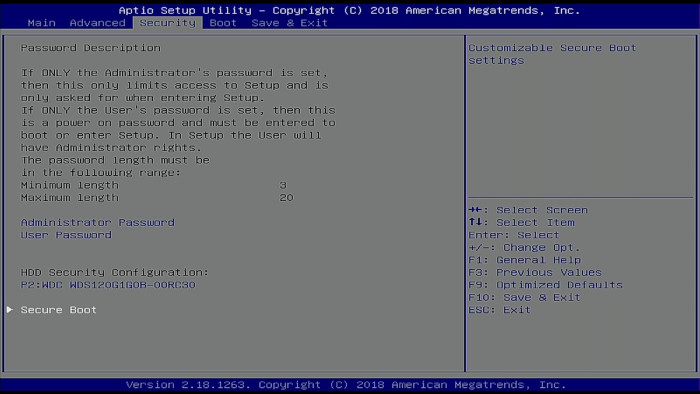
Para activar/desactivar el Secure Boot iremos hacia la pestaña "Security" usando las flechas, dentro de Security seleccionaremos "Secure Boot".
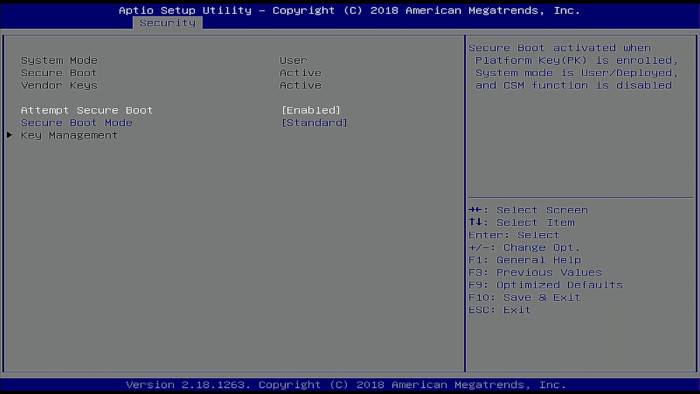
Una vez dentro podemos activar/desactivar el Secure Boot.
Luego nos iremos a la pestaña "Save & Exit" y pulsaremos en "Save Changes and Exit" o pulsaremos directamente la tecla"F10" para guardar y salir.


Como activar/desactivar el Secure Boot en el Katana II, Excalibur NVIDIA/Intel, ONE v2
Eusebio Giner Slimbook 15 de mayo de 2017
Compartir esta publicación
Etiquetas
Nuestros blogs
Archivar
Iniciar sesión para dejar un comentario